
Blog
7 October 2026
How to Prepare Property Images for Different Screen Sizes, Listing Portals and Marketing Channels
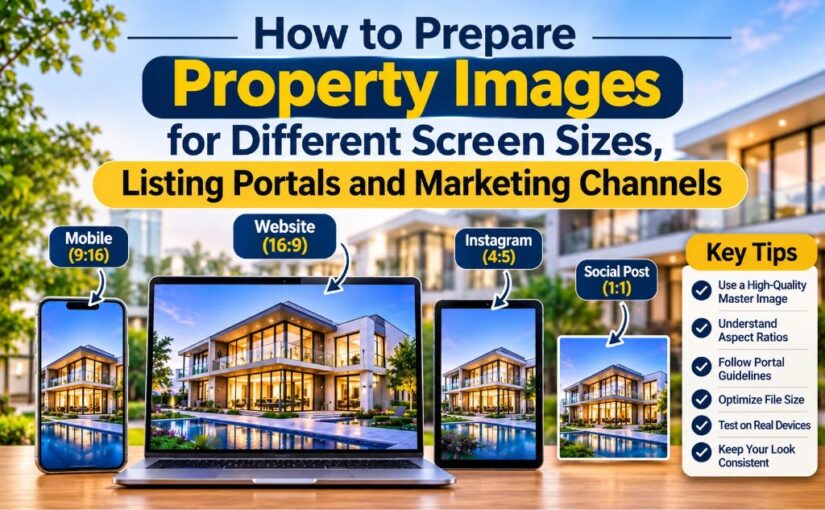
You shoot one set of photos, but buyers see them everywhere. One person scrolls on a phone. Another browses on a laptop. A third spots your listing as a tiny thumbnail on a portal, or as a square post on Instagram. If you use the same file for all of them, something gets cropped, blurred or squashed. Smart property photo editing starts with one question: where will this image end up?
Why One Size Never Fits Every Screen
A photo that looks sharp on your camera screen can fall apart online. Portals crop images to fit their layouts. Social apps change shape. Phones shrink everything. Preparing your images for each channel takes a little extra work, but it keeps your best angles in view and your listing looking professional.
Start With a High-Quality Master File
Always keep one large, clean master image for every photo. Edit it properly first: fix the exposure, straighten the vertical lines, balance the colours and remove clutter. Then make smaller copies from this master for each channel. Never shrink a photo and then enlarge it again, because it will look soft and pixelated.
Understand Aspect Ratios
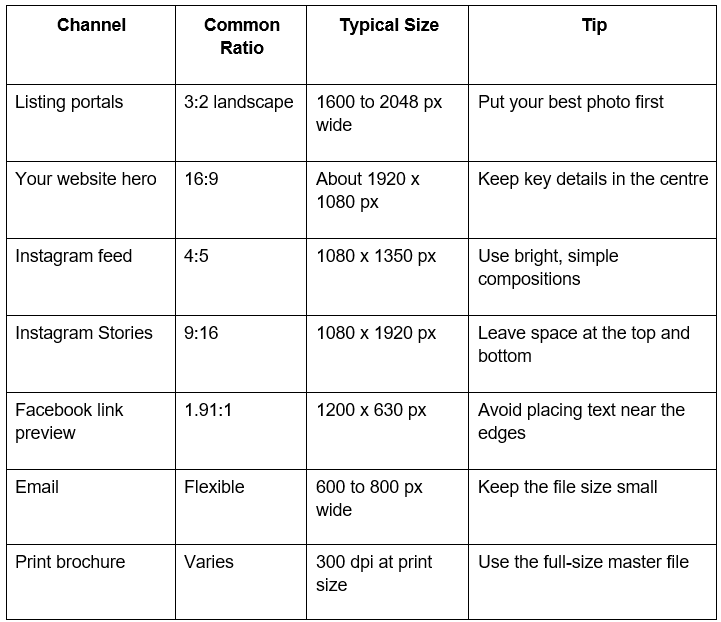
The aspect ratio is the shape of your photo, such as wide or square. Most cameras shoot in 3:2. Many portals show landscape images and crop the rest. Instagram prefers a taller 4:5 shape for feed posts, and Stories use a tall 9:16 frame. Before you crop, look at the important parts of the image, like the main room, the view or the front of the house. Keep those in the centre so no platform cuts them off.
Follow Each Portal's Rules
Every listing portal has its own image rules. Some set a minimum width. Some limit file size. Some reorder or crop photos automatically. Sizes change from time to time, so check each portal's current guidelines before you upload. As a general rule, use landscape photos, keep the width at 1600 to 2048 pixels, and put your strongest image first, because that's the one buyers see in search results.
Adapt Photos for Social Media and Marketing
Marketing channels need more than a resized file. A brochure needs high resolution for print. An email needs a light, narrow image. A social post needs a bold, simple view that works at a glance. This is where professional Photo Editing Services save you time, since a good team prepares every version in one go and keeps the quality steady across all of them.
Here's a quick guide to common sizes. Check the latest platform rules before you publish.
Keep File Sizes Light
Big files load slowly, and slow pages lose buyers. Compress your images before you upload them, but don't overdo it. Heavy compression adds blocky patches, especially in skies and walls. Aim for a balance where the photo stays crisp and loads quickly. For web use, saving as JPEG or WebP at good quality usually works well.
Test on Real Devices
Don't trust the editing screen alone. Open your finished images on a phone, a tablet and a laptop. Check the thumbnail, too. If a photo looks dark on a phone or too busy as a thumbnail, adjust it and test again.
Keep Your Look Consistent
Buyers notice when photos change in colour or style from one image to the next. Use the same colour balance, brightness and cropping style for the whole set. Consistent property photo editing makes a listing feel polished and trustworthy, and it helps your brand stand out when the same photos appear on your website, portals and social pages.
Conclusion
Great property photos only work when they look right on every screen. Prepare a strong master file, crop for each channel, follow portal rules, keep files light and test your results. If you'd rather leave the technical work to experts, our photo editing services can handle all of it for you.
Image Editing India prepares property images for every portal, screen and marketing channel, so your listings look sharp everywhere. Contact us today and get your next set of photos ready to publish.